NativePal has grammar lessons: a course for the language you are learning, level by level from A1 to C2, one topic at a time. Each lesson explains one grammar point in your own language, with tables, example sentences you can listen to, a comparison with your own language and the mistakes learners usually make, and ends with an 8-question quiz written with new sentences every time. The Japanese course uses JLPT levels N5 to N1, Chinese HSK 1 to 6 and Korean TOPIK 1 to 6.
NativePal does. Its grammar lessons are a course for the language you are learning, one topic at a time, and every explanation is written in the language you already speak: a Spanish speaker learning Japanese reads about Japanese in Spanish. Each lesson has tables, example sentences you can listen to, a comparison with your own language and the mistakes learners usually make, and ends with an 8-question quiz written with new sentences every time.
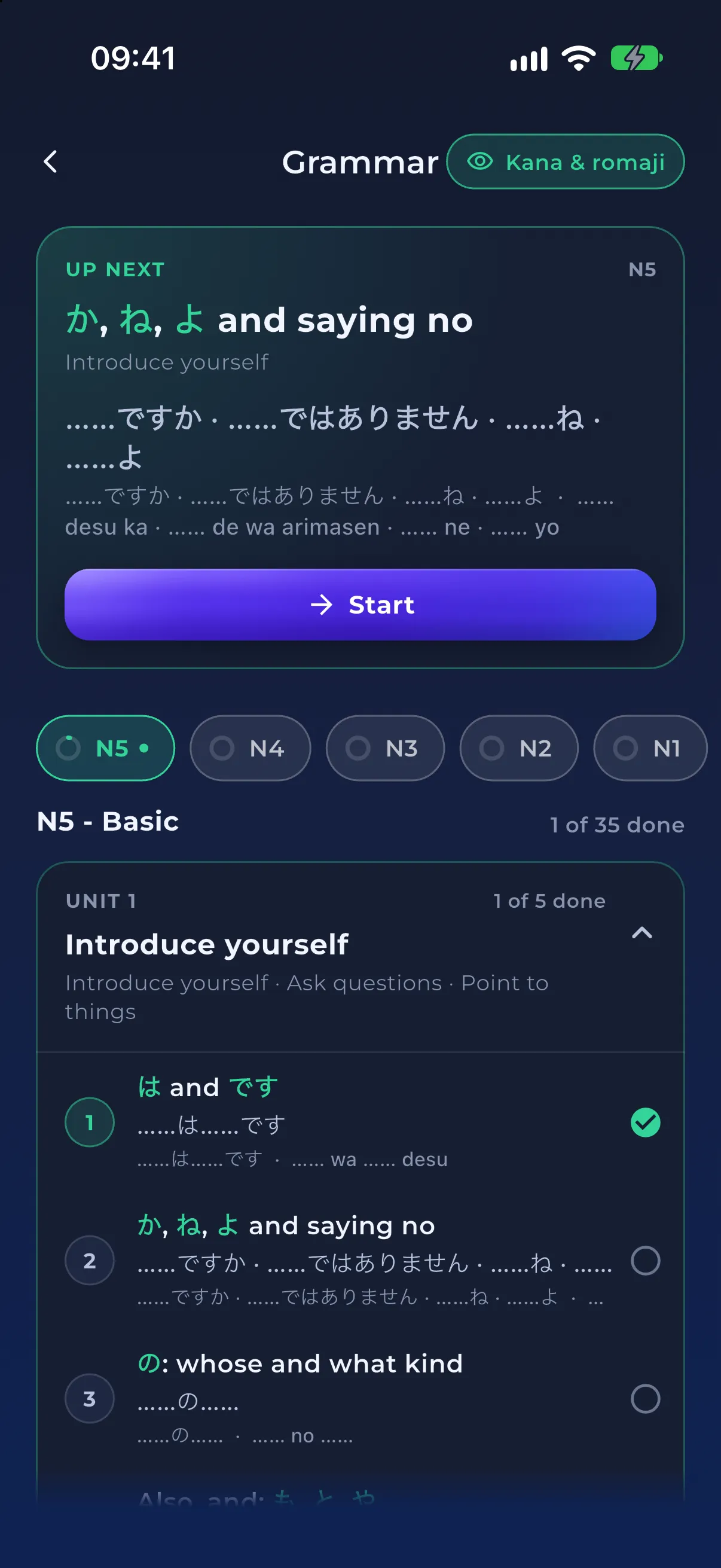
NativePal. Its grammar course for the language you are learning is arranged by level, from A1 to C2 or by JLPT, HSK and TOPIK levels for Japanese, Chinese and Korean, in short units with everyday goals such as Introduce yourself. It opens on your level with an Up next topic, and nothing is locked. Each lesson teaches one grammar point, and the answers you get wrong in its quiz are saved to your mistakes for later practice.
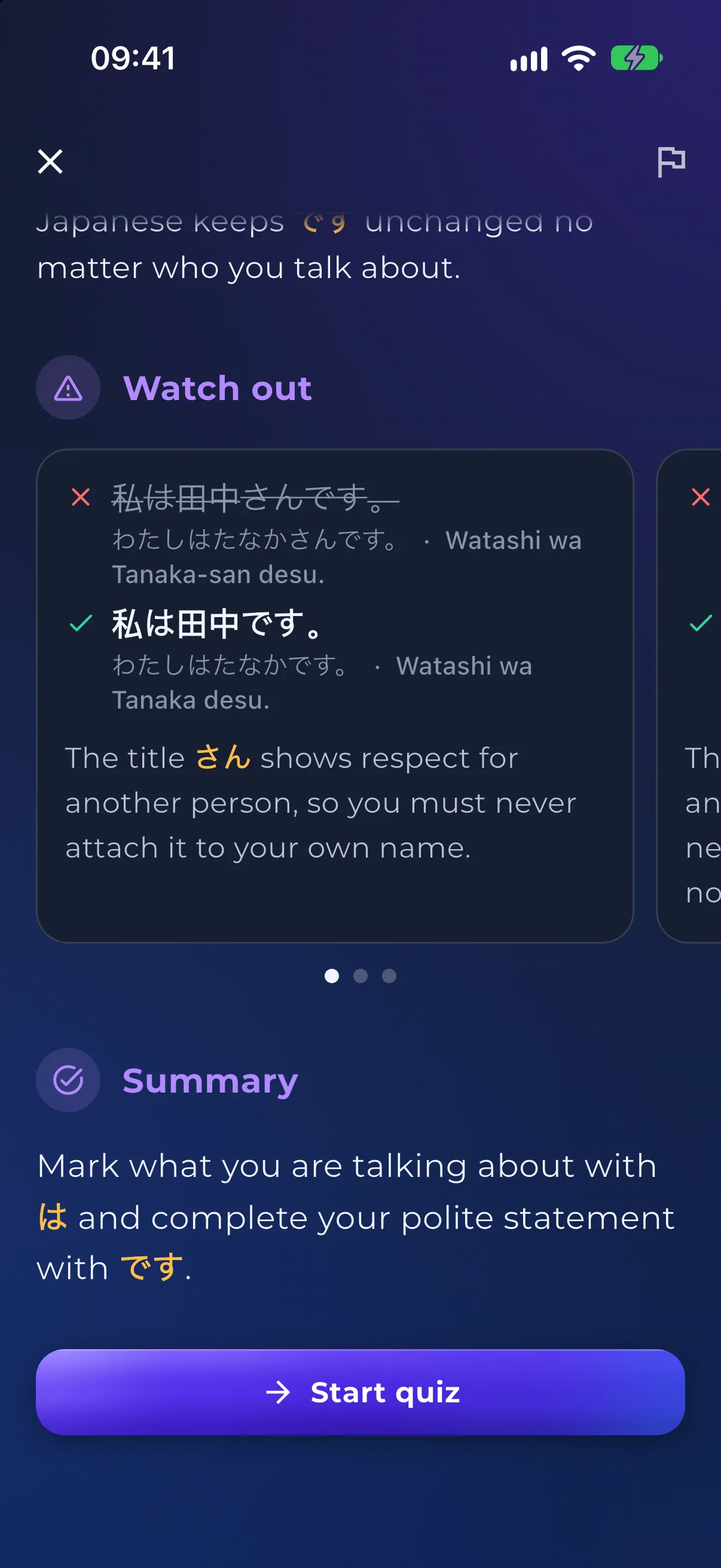
Learn hiragana and katakana first with NativePal's alphabet lessons, then open the Japanese grammar course at N5. Its first unit, Introduce yourself, starts with は and です, the polite way to say who you are, explained in your own language with kana and romaji readings you can switch on or off, and example sentences such as 私は田中です (I am Tanaka) that you can listen to. A quiz with new sentences follows every lesson, and the course carries on through N4 to N1.
The grammar course is laid out by level: CEFR A1 to C2, or JLPT, HSK and TOPIK levels for Japanese, Chinese and Korean. Each level is split into short units with everyday goals, such as Introduce yourself or Ask questions, and each unit into a few topics, well over a hundred in a course. The course opens on your own level with an Up next card for the next topic to do, and nothing is locked: open any topic at any level, in any order. Starting from scratch? Learn a language from zero shows where grammar fits beside the alphabet, vocabulary and reading.
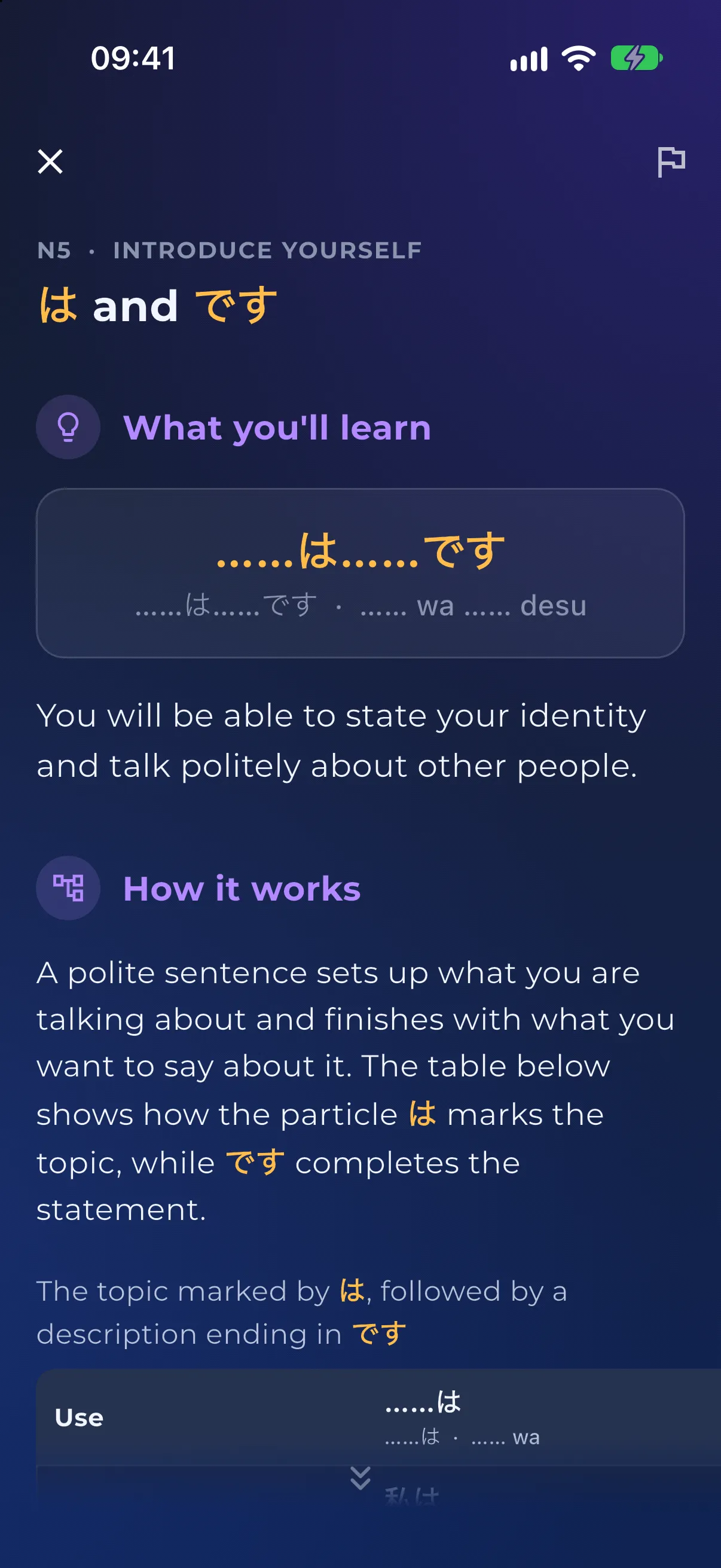
Each topic is a single lesson on one grammar point, read top to bottom on one page. What you'll learn shows the pattern and what it will let you say, and How it works explains it in short paragraphs. The explanations, table labels, translations and notes are in your own language, while the forms and the example sentences are in the language you are learning. In the Japanese lesson on は and です, an English speaker reads that は marks what you are talking about and です completes a polite statement about it.
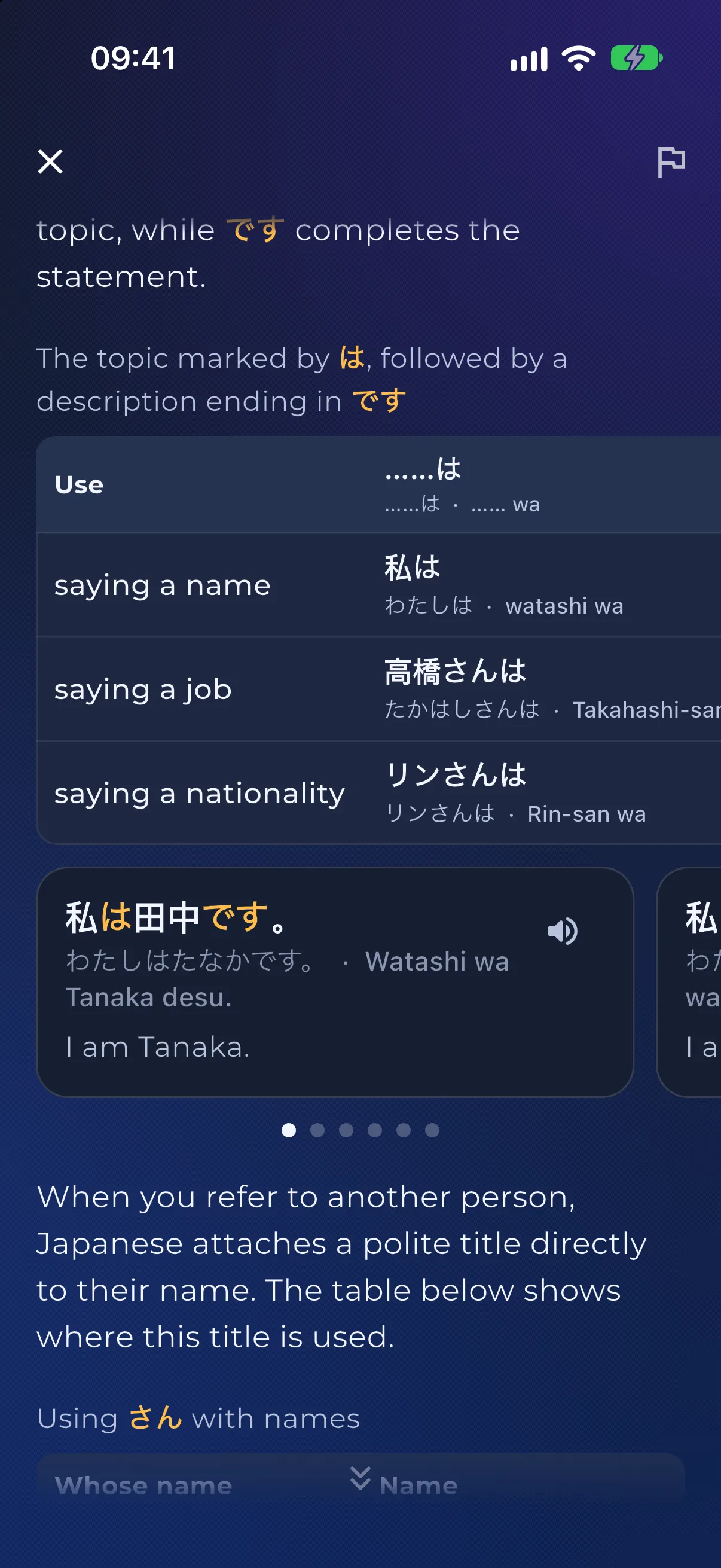
Forms are laid out in tables, with headings and row names in your own language, and each table is followed by example cards to swipe through. A card shows the sentence with the grammar point highlighted, its translation, sometimes a short note, and a speaker button that reads it aloud in your phone's own voice, like 私は田中です, I am Tanaka. Courses for languages not written in Latin letters can show readings under every line: kana and romaji for Japanese, pinyin for Chinese and Latin letters for the rest. You switch them on or off for each language.
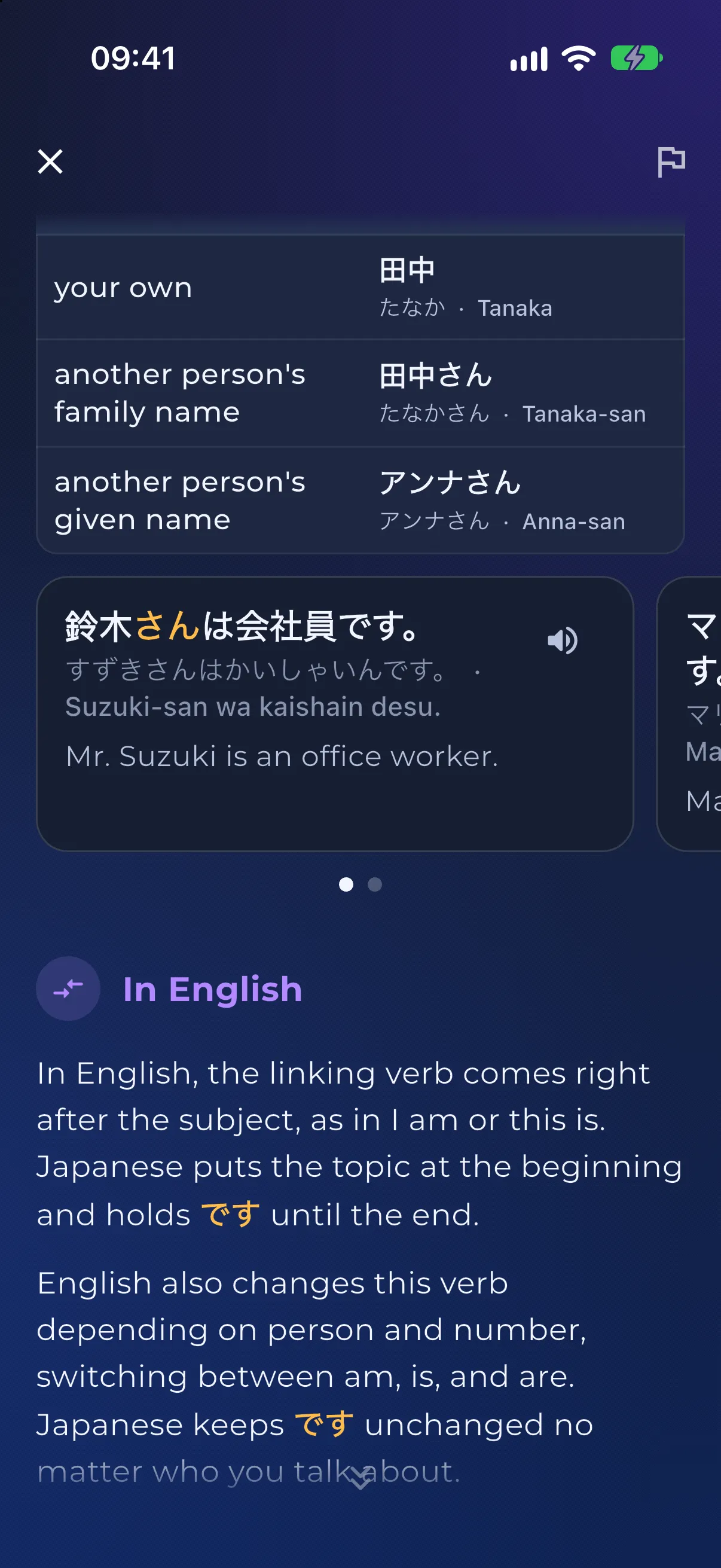
Each lesson has a section headed with your own language, In English for an English speaker, that shows how your language does the same job. In the は and です lesson it points out that English puts the linking verb straight after the subject and switches between am, is and are, while Japanese holds です until the end of the sentence and never changes it, whoever you are talking about.
Watch out shows two to four common mistakes, each as a wrong sentence struck through, the right one and a line on why. In Japanese, 私は田中さんです is crossed out in favour of 私は田中です, because さん is a polite title for other people and never goes on your own name. A short Summary closes the lesson, with the Start quiz button below it.
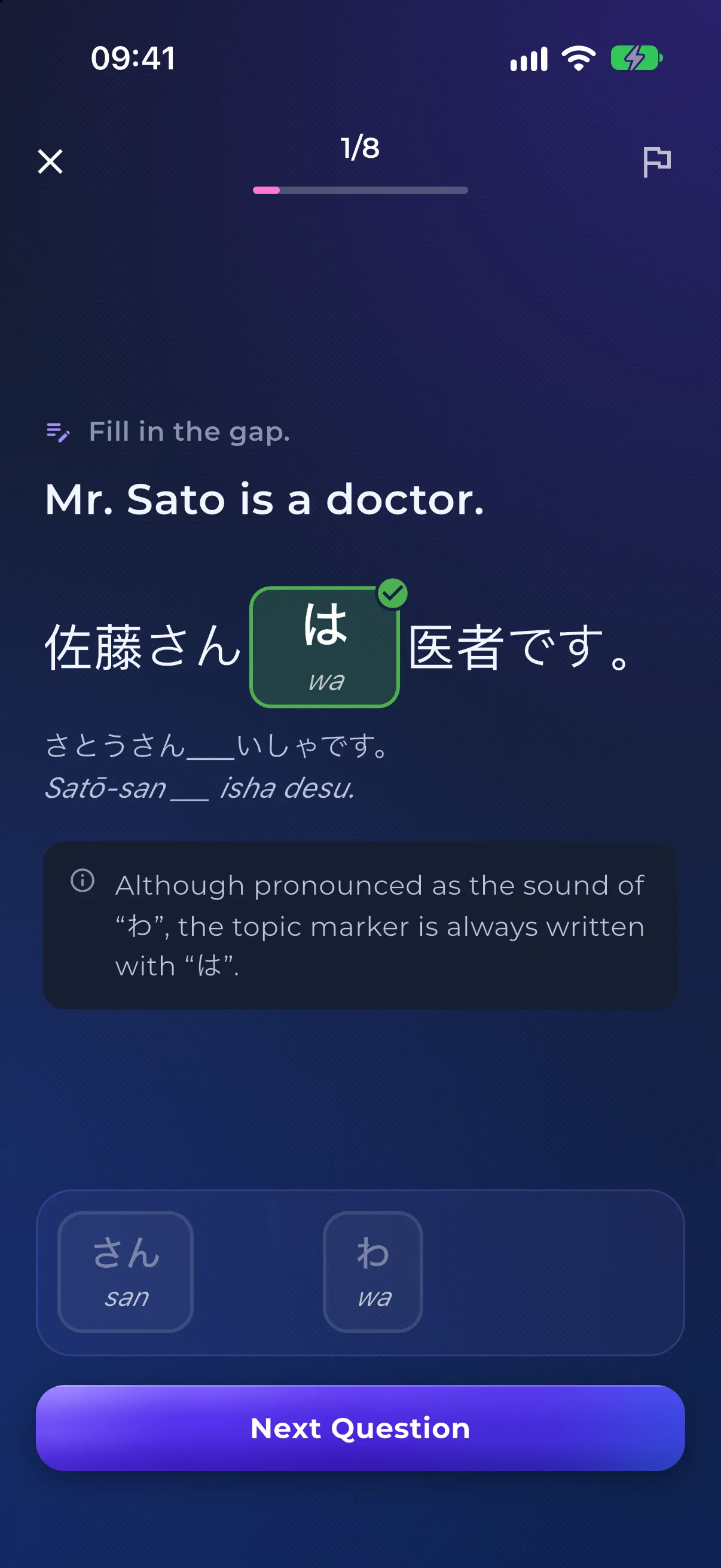
Start quiz writes 8 questions with new sentences, never the lesson's own examples, and a second AI pass answers and checks every question before you see it. You fill gaps by tapping words from a small bank that also holds wrong ones, complete short lines that share one bank, or pick the correct sentence of two. After every answer, right or wrong, a short tip in your own language explains it: here, that the topic marker sounds like わ but is always written は. Try Again writes a fresh set.
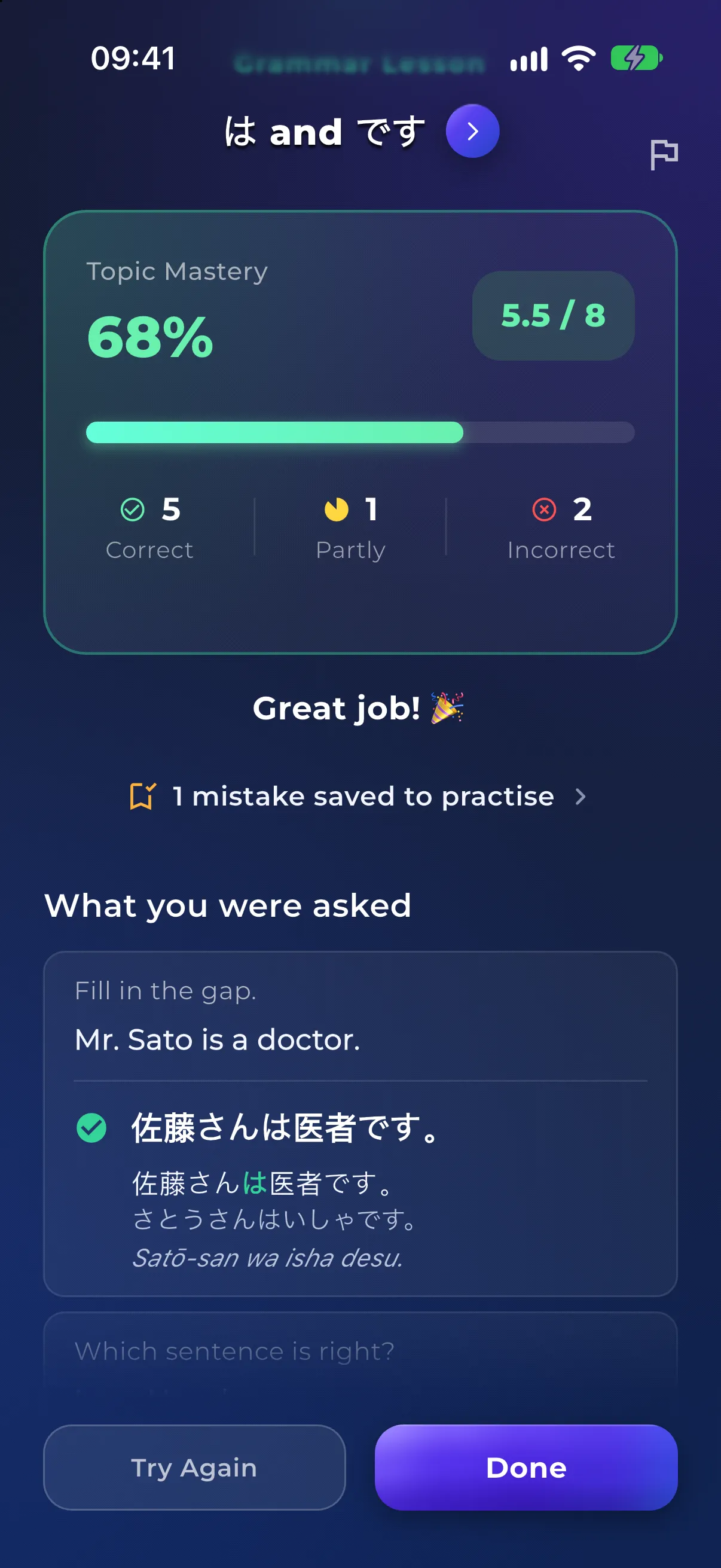
Answers are scored per gap, so two of three gaps right counts as two thirds of a point, and the results show your Topic Mastery with right, partly right and wrong answers. What you were asked lists every question with your answer and the right one. Wrong and partly right answers are saved to Library > Mistakes as one item for the topic, where they come back as practice and Learn the rule opens this lesson again. Finishing a quiz, whatever the score, marks the topic done and counts toward your streak.
Each course teaches one main form of the language. The Spanish course, for example, teaches the Spanish of Spain, and on topics where Latin American Spanish says it differently, a Regional note near the end of the lesson explains the difference in your own language, with example sentences of its own. You can't switch the main variety, and regional examples are read in the course's main voice.
Grammar quizzes are tapped: there are no typing, listening or speaking questions, and words in a lesson can't be tapped for a meaning or saved to your dictionary. There is no placement test; the course opens on the level you set. Lessons need an internet connection, and a topic opened for the first time by someone who speaks your language is written on the spot, which can take up to about a minute; after that it opens quickly. Example sentences are read by your phone's own voice, not recordings, and the speaker is hidden if your phone has no voice for the language. Topic and unit titles show in English for now.
For learners who
Starting from zero: alphabet lessons, first words, grammar one topic at a time, guided scenarios and A1 reading, with explanations in your own language.
For learners who
The interface, explanations and feedback come in 57 languages, so a Vietnamese speaker learning Japanese is not routed through English. What that covers.
Shortlist
Starting from zero, including a new alphabet? These are the apps that actually begin at the beginning, compared honestly.
Shortlist
Outgrown the owl? The best Duolingo alternatives for speaking, reading, grammar and retention, including what Duolingo still does better.
Comparison
Babbel vs NativePal — Babbel has expert-written courses in around 14 languages. NativePal adds levelled reading, SRS vocabulary, and per-sound pronunciation scoring in 57.
Comparison
NativePal vs Busuu: community corrections and CEFR courses against a full practice loop with scored pronunciation. Where each one wins.
Comparison
NativePal is a Duolingo alternative for real practice: levelled reading, spaced-repetition vocabulary, pronunciation scoring, and conversation. Free to start on iOS and Android.
Yes. Since version 2.12 (November 2026), NativePal has grammar lessons: a course for the language you are learning, level by level from A1 to C2, one topic at a time. Each lesson explains one grammar point in your own language, with tables, example sentences you can listen to, a comparison with your own language and the mistakes learners usually make, and ends with an 8-question quiz written with new sentences every time.
Only if English is your language. The explanations, table labels, translations, the comparison with your own language and the notes on common mistakes are written in your own language, the one you chose for the app. The forms and the example sentences are in the language you are learning. Topic and unit titles show in English for now.
Courses run from CEFR A1 to C2, or JLPT N5 to N1 for Japanese, HSK 1 to 6 for Chinese and TOPIK 1 to 6 for Korean. Each level is split into units with everyday goals, such as Introduce yourself or Ask questions, and a course has well over a hundred topics. The Spanish course, for example, reaches the present subjunctive at B1.
Start quiz at the end of a lesson writes 8 questions with new sentences, never the lesson's own examples, and a second AI pass checks every one before it appears. You fill gaps by tapping words from a small bank, complete short lines that share one bank, or pick the correct sentence of two; there is no typing, listening or speaking. Each answer gets a short tip in your own language, points are given per gap, and Try Again writes a new set.
No. The course opens on the level you set for the language, with an Up next topic to start from, and nothing is locked: you can open any topic at any level, in any order. When a topic builds on one you haven't read yet, the lesson names it, so you can go back first if you like. There is no placement test.
AI does, with checks. Each course is written by AI in advance for that language and checked by a second AI review before it is published: its topics, placed by level using published references such as the Instituto Cervantes Plan curricular for Spanish, the English Grammar Profile, Profile deutsch and China's 2021 Chinese proficiency grading standards, and the forms, tables and example sentences, the same for everyone learning that language. Then AI writes the explanation in your own language the first time someone who speaks it opens the topic, a second AI pass checks every quiz before you see it, and every lesson and quiz has a Report button for anything that looks wrong.
Yes, with help, and it is worth learning the letters too. The explanations are always in your own language. For languages not written in Latin letters, a readings switch at the top of the course shows a reading under every line of the language you are learning, in the course, the lessons and the quizzes: kana and romaji for Japanese, pinyin for Chinese and Latin letters for the rest. Pinyin, and kana with romaji, start on for everyone; Latin letters start on only if your own language is written in them and you do not already read the script. You can switch readings on or off at any time. To learn the script itself, start with Alphabet Lessons.
Wrong and partly right answers are saved to Library > Mistakes as one item for the topic, and the results tell you how many were saved. There they come back in short practice sessions until you have got them right on three different days, and Learn the rule opens the lesson again.

Explore More Features
Download NativePal on iOS or Android and open the grammar course for the language you are learning.
Alphabet lessons from zero in 57 languages • Grammar lessons • Mistakes review • Levelled reading • Spaced-repetition vocabulary • Pronunciation feedback