NativePal keeps the mistakes you make in lesson quizzes, chats and the daily speaking challenge, sorts them into words, grammar and letters, and brings them back in short practice sessions until you have got each one right on three different days. There is nothing to set up: your mistakes wait on the Mistakes tab in your Library, and each practice session is written from them, often from your own sentences.
NativePal does. It keeps the mistakes you make in lesson quizzes, chats and the daily speaking challenge, sorts them into words, grammar and letters, and brings them back in short practice sessions until you have got each one right on three different days. There is nothing to set up, and each practice session is written from your own mistakes, often from your own sentences.
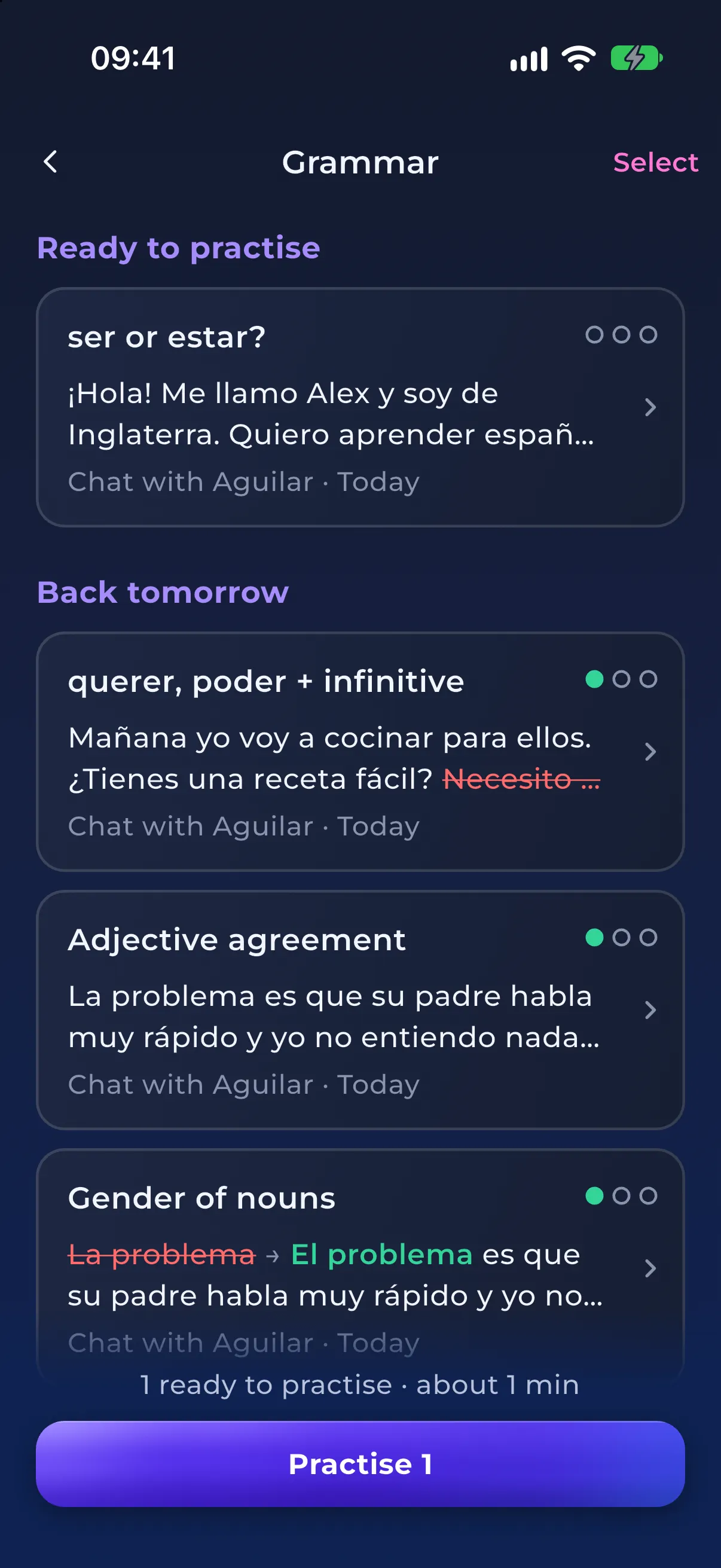
Practise the exact mistakes you make until they are fixed. In NativePal, grammar corrections from your chats and the daily challenge are grouped by rule, so soy for estoy and es for está both count as one mistake, ser or estar, and come back as short practice with your own sentence and new ones. When a mistake matches a topic in the grammar course, Learn the rule opens that lesson.
Yes. In NativePal, the corrections in the tips on your chat messages, typed or spoken, are saved to the Mistakes tab in your Library, up to three per message, and so are the errors from the daily speaking challenge's feedback. The app sorts them into words and grammar, then builds short practice sessions from them, with a Say it right question for things you said out loud, until you have got each one right on three different days.
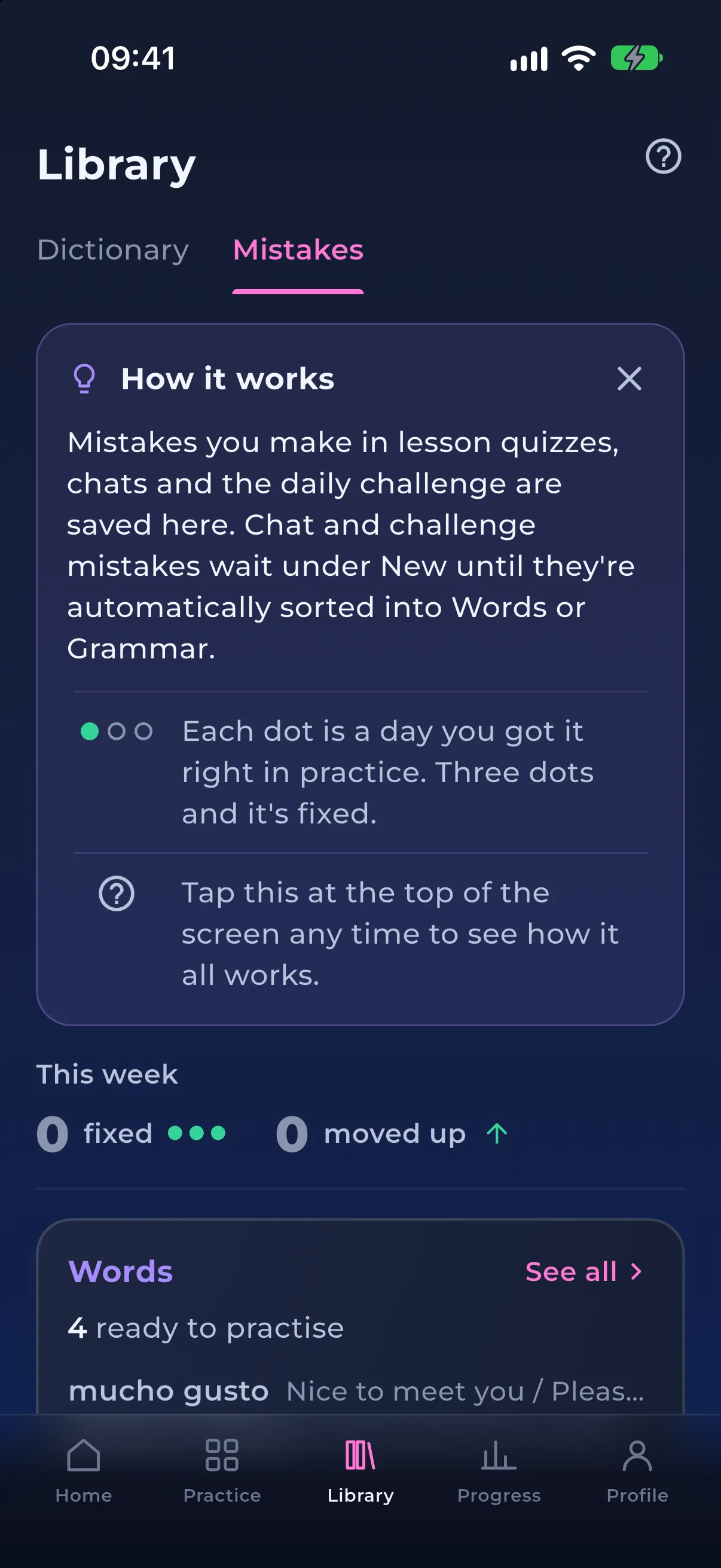
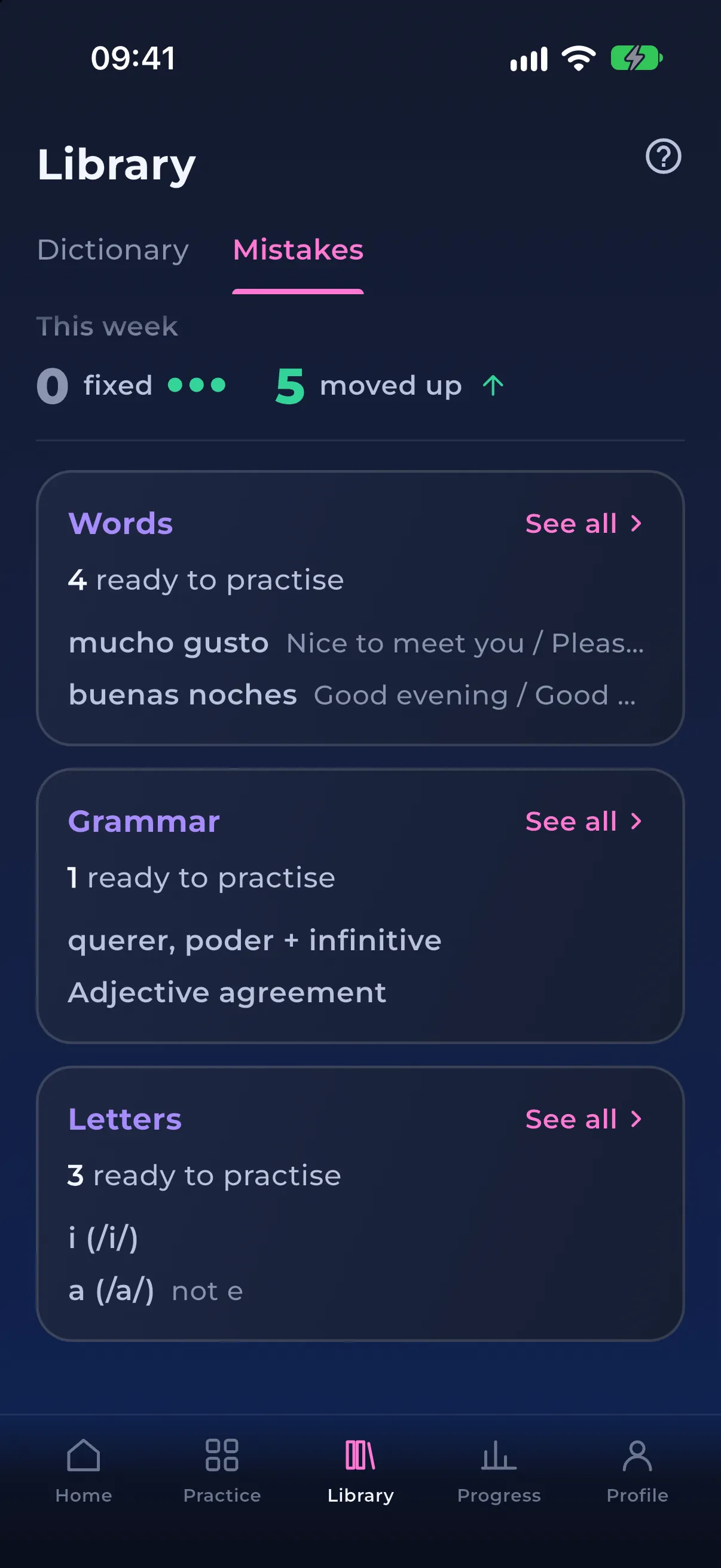
There is nothing to switch on or fill in. The mistakes you make are saved for the language you are learning, on a Mistakes tab in the Library beside your Dictionary, in three sections: Words for words and phrases you got wrong or mixed up, Grammar for grammar points, and Letters for letters you confused in alphabet quizzes. Each section shows how many mistakes are ready to practise, or when the next ones will be, and This week counts the ones you fixed or moved up a dot.
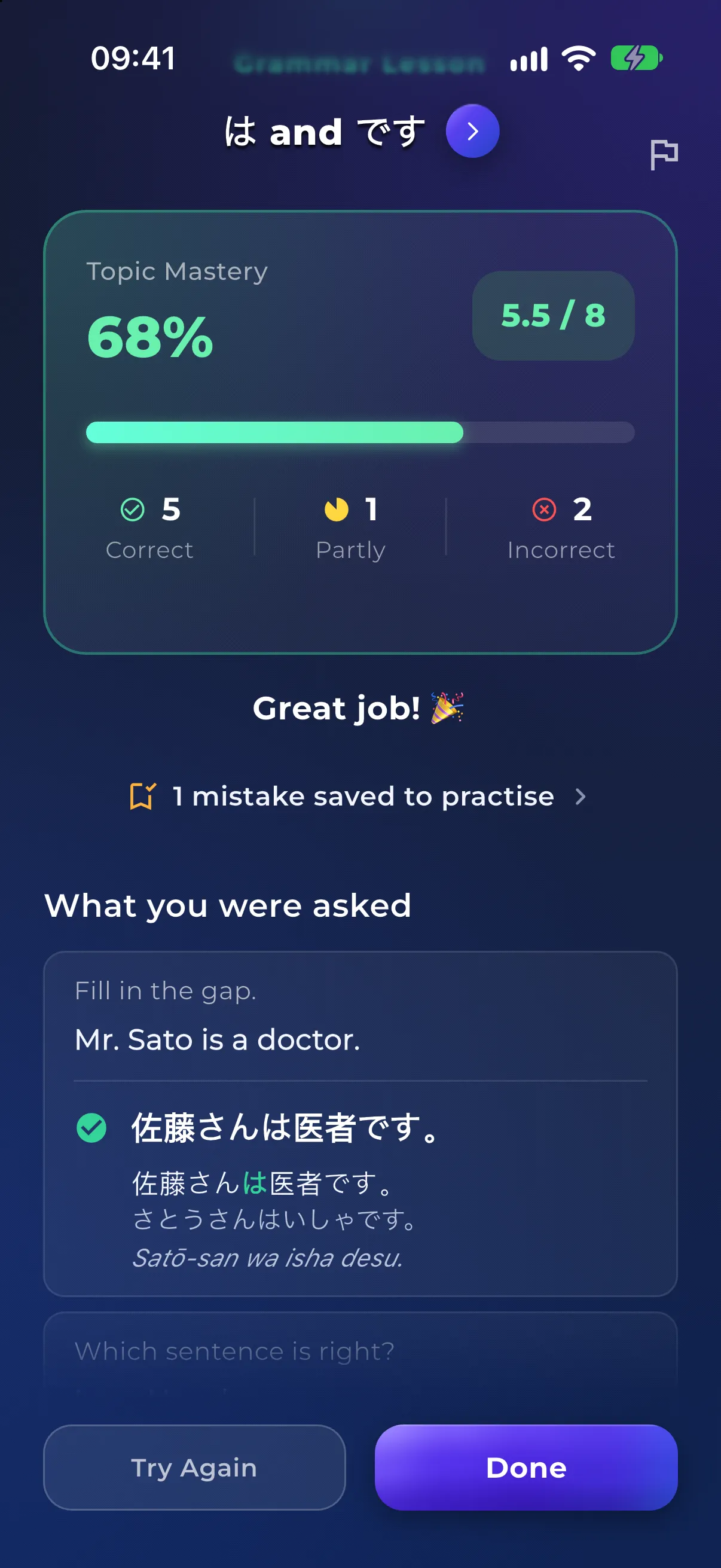
Wrong and partly right answers in the quizzes at the end of vocabulary, grammar and alphabet lessons go straight into Words, Grammar or Letters when the quiz ends, and so do misses on the reading quiz's questions about what a word means. The results say how many were saved, like 1 mistake saved to practise after a grammar quiz, and one tap opens them. Missing the same word, letter or grammar topic more than once in a quiz counts as one mistake.
The tips on your chat messages, typed or spoken, correct what you wrote or said, and up to three corrections per message are kept, even if you never open the tips. The daily speaking challenge adds up to four from its feedback. They wait under New, as lines like tiene → tengo, until the app sorts them into Words or Grammar by itself, at most once an hour, and drops any that turn out not to be real mistakes, such as a change of capitals or punctuation. Say a word in your own language because you don't know it yet, and the word you needed is saved too.
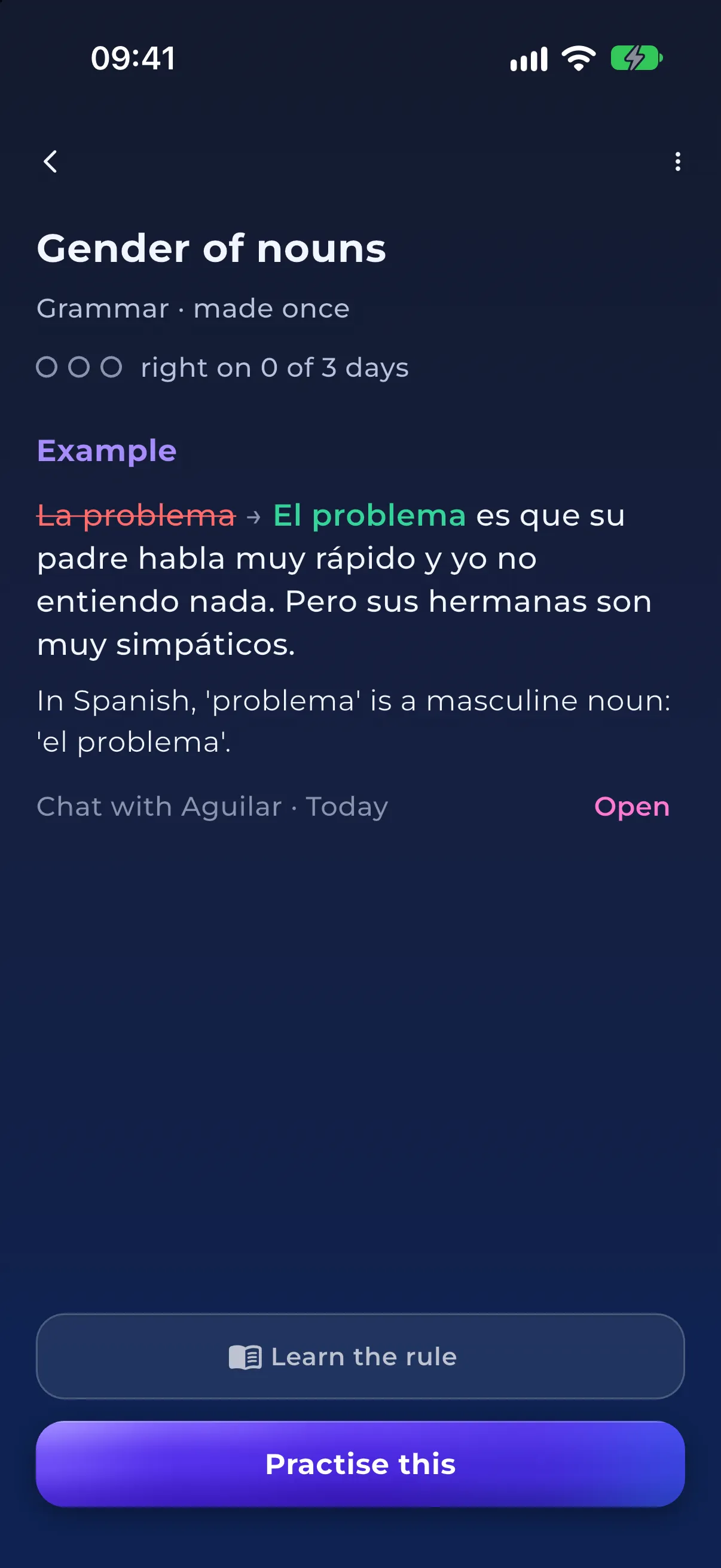
Making the same mistake again doesn't add a new entry; it adds an example to the one you have, and the count goes up. Grammar is grouped by the rule rather than the sentence, so soy for estoy and es for está both count as ser or estar. A mistake's page shows its three dots, your words struck through with the fix in your own sentence, why it was wrong, and where it happened, with a way back to that chat or challenge. When it matches a topic in the grammar course, Learn the rule opens that lesson.
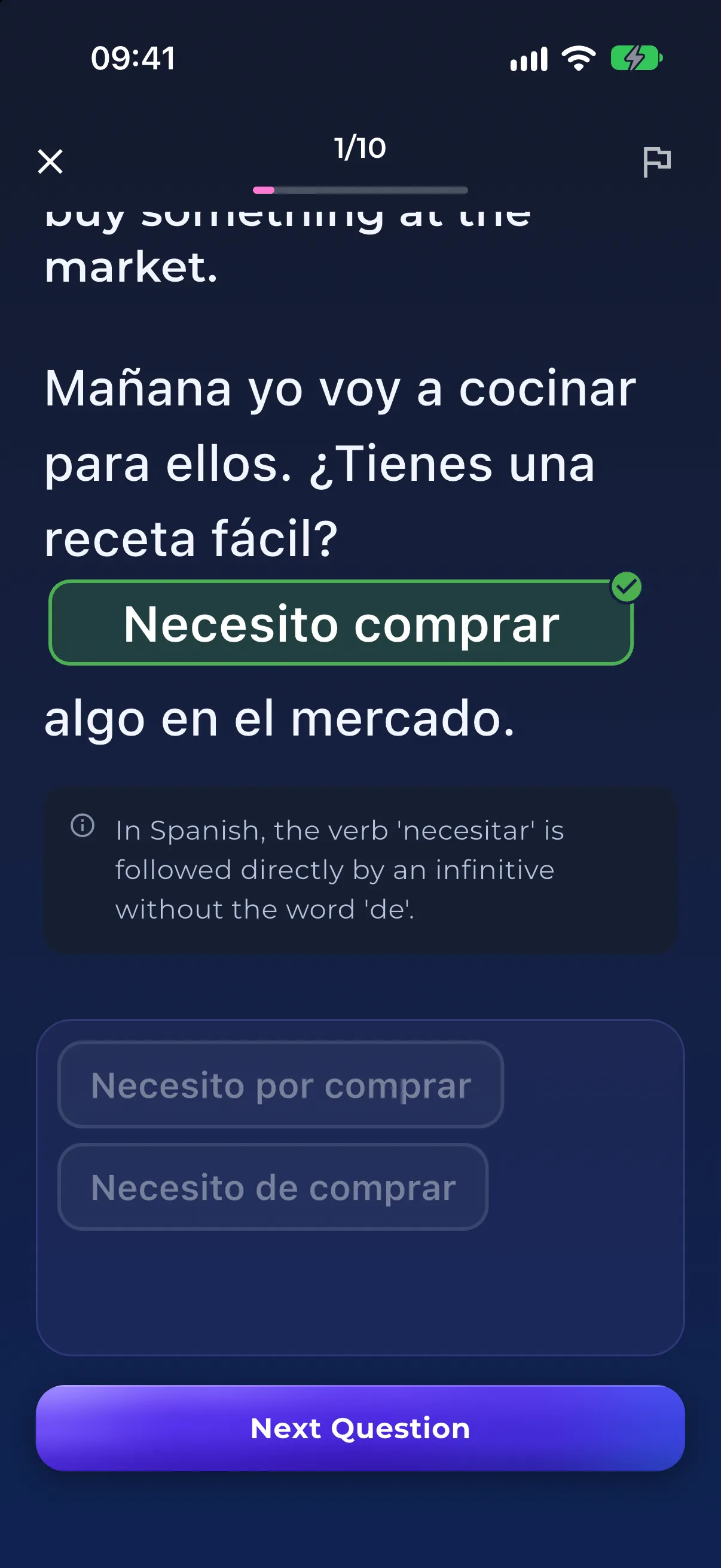
A session covers one section, with up to six mistakes that are ready, or up to eight you pick yourself, and about two questions for each. The first time, one question is the original, the quiz question you missed or your own sentence with the fixed words as a gap, and the other is new. Later sessions write new questions every time: a gap in a new sentence with your old wrong form among the choices, the right one of two sentences, or the word with a given meaning. Every answer is explained, and a full session takes about five minutes.
Each mistake has three dots, one for each different day you get it right in practice. After the first dot it rests for a day, after the second for three days, and the third dot marks it fixed. A wrong answer, or making the same mistake again in a chat, quiz or challenge, takes one dot back, never all three. The results show the dots moving on the mistakes that were ready to practise, and a fixed mistake you make again comes back with a Came back tag.
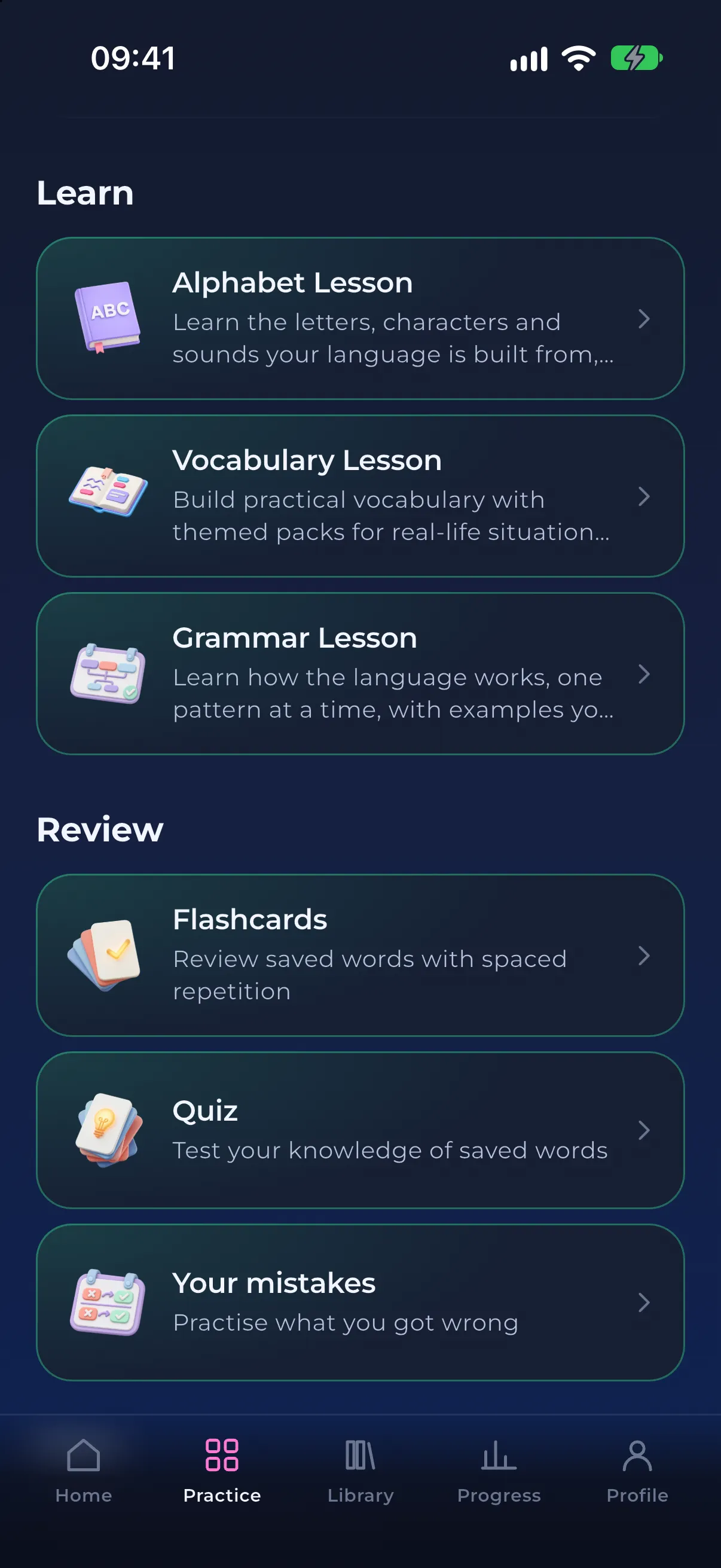
On the Practice tab, the Your mistakes card under Review shows a badge such as 6 ready and opens the Mistakes tab. Home can suggest a session once three or more mistakes in one section are ready and you haven't practised them that day. From a section's page you can practise up to six ready ones in one go, or tap Select to pick up to eight, and Practise this on a single mistake starts with that one. Every finished session counts toward your streak and shows up in your Progress history.
Mistakes you made out loud, in a voice message or the daily challenge, also get a Say it right question. Tap Listen to hear the corrected sentence in your phone's voice, then say it yourself and see what the app heard. It is extra speaking practice, so it never moves a dot, and it appears only on phones that can listen in that language with the microphone allowed.
Not everything you get wrong is saved: flashcards, the dictionary Quiz, the teleprompter and reading questions about the story add nothing, and pronunciation is not tracked. You can't add or delete mistakes yourself; a quiz mistake leaves the list by being fixed, and a correction from a chat or the challenge that you disagree with can be removed with Not a mistake. The schedule is the same simple three-dot rule for everyone, not an adaptive algorithm, and nothing reminds you when mistakes are ready. It needs version 2.12 or later and an internet connection, and it saves the mistakes you make from then on.
For learners who
How to practise speaking a language with no partner or tutor: timed free speech, texts read aloud with pronunciation scoring, and roleplay that answers back.
For learners who
You pass lessons but cannot produce the language. What the intermediate plateau is, why gamified apps cause it, and a practice loop that gets you speaking.
Shortlist
Outgrown the owl? The best Duolingo alternatives for speaking, reading, grammar and retention, including what Duolingo still does better.
Comparison
ChatGPT can roleplay in any language. NativePal is the language app: levelled reading, SRS vocabulary, pronunciation scoring, and beginner lessons. Compare ChatGPT vs NativePal.
Comparison
NativePal is a Duolingo alternative for real practice: levelled reading, spaced-repetition vocabulary, pronunciation scoring, and conversation. Free to start on iOS and Android.
Comparison
NativePal vs Busuu: community corrections and CEFR courses against a full practice loop with scored pronunciation. Where each one wins.
Yes. Since version 2.12 (November 2026), NativePal keeps the mistakes you make in lesson quizzes, chats and the daily speaking challenge, sorts them into words, grammar and letters, and brings them back in short practice sessions until you have got each one right on three different days. You find them on the Mistakes tab in the Library, for the language you are learning.
Wrong and partly right answers in vocabulary, grammar and alphabet lesson quizzes are saved, and so are misses on the reading quiz's questions about what a word means, up to three corrections from the tips on each chat message, typed or spoken, and up to four errors from each daily challenge. Flashcards, the dictionary Quiz, the teleprompter and reading questions about the story add nothing, and suggestions for more natural wording are not saved.
Pick a section, Words, Grammar or Letters, and practise up to six mistakes that are ready, or select up to eight yourself. Each gets about two questions written for it, such as your own sentence with a gap or a new sentence to complete, and every answer is explained. Mistakes you said out loud also get a Say it right question. A full session takes about five minutes and counts toward your streak.
When you have got it right in practice on three different days. Each of those days earns a dot: after the first, the mistake comes back a day later, and after the second, three days later, so fixing one takes at least about four days. A wrong answer takes one dot back, never all three, and so does making the same mistake again.
In a simple, fixed form. Every mistake follows the same three-dot rule, resting a day after its first dot and three days after its second, rather than an algorithm that adapts to you. The words you save to your dictionary still have their own spaced-repetition flashcards.
No. Pronunciation is not tracked, and the pronunciation feedback on voice messages and teleprompter takes is not saved. Mistakes you make while speaking are saved as words and grammar, from what the app heard, and likely mishearings are dropped. They also get a Say it right question, where you hear the corrected sentence and say it yourself, but it doesn't move a dot.
Not directly. A mistake leaves the list by being fixed. If a correction from a chat or the daily challenge wasn't really a mistake, Not a mistake removes it and stops it coming back, with an Undo in case you tap it by accident. You can't add mistakes yourself.
No notification tells you when mistakes are ready. Instead, Home can suggest a session once three or more mistakes in one section are ready, and the Your mistakes card on the Practice tab shows how many are waiting, such as 6 ready.
Explore More Features
Download NativePal on iOS or Android, and the mistakes you make from now on come back until you get them right.
Alphabet lessons from zero in 57 languages • Grammar lessons • Mistakes review • Levelled reading • Spaced-repetition vocabulary • Pronunciation feedback